
This article is ancient. Unity has analytics built in now, and also there’s a modern Asset Store implementation if you’re looking for Google Analytics in particular: https://www.assetstore.unity3d.com/#/content/11098
As a game developer I’m terribly jealous of the data-gathering schemes that companies like Valve and Bungie have going. Take Valve for example: they have detailed stats of where players get killed in their games. This is invaluable stuff for creating a consistent level of difficulty. I decided that I wanted a system like this of my own.
I started designing a database and looking at server-side programming languages. After I’d been working on this for a couple of days, I thought “logging events and aggregating statistics is incredibly common, someone must’ve done this already. If only I could use their code…”
Then I realised, Google Analytics. Duh!
Google Analytics logs web traffic numbers and gives you a nice user interface for slicing and dicing the data. Not only had they already written the server code, they also run the server for you! It’s free for the first 5 million page-views per month. I’d been reinventing the wheel.
All I had to do was trick Google, by feeding them a special fake page view whenever a player dies. I soon discovered that Google was way ahead of me. They already have an API for tracking ‘events’ that happen on a page. People seem to mostly use these for integrating e-commerce sale figures into their web traffic reports, but it’s equally suitable for tracking in-game events.
Setting Up
If you sign up for Google Analytics and put their Javascript snippet in the page with the game, you’re all set. You’ll need your own domain name, or a subdomain at the least to sign up.Here’s the code you need to run in Unity whenever something happens:
Application.ExternalCall("pageTracker._trackEvent", new object[] { category, action, label, value} );
Um, that’s all of it. This is a non-blocking call to run a Javascript function in the page that holds the Unity Player. I haven’t investigated triggering events from a standalone app yet.
The line above will work with the standard Javascript that Google hand out upon signing up. Note that you won’t be able to test it locally - it needs to run on a page hosted at your domain. If you run it locally, you’ll get an error in the Javascript console saying ‘O not defined’.
Data Model
By now you’re probably wondering what the 4 parameters are to our function call:- Category. This is a free-form string used to categorise your events. It’s the highest level of organisation applied to your events. I’ve been storing a concatenation of the game name, version number and level ID in here.
- Action. Another free-form string which represents the type of event. I’ve been using actions such as “killed” and “game_start”.
- Label. This is an optional string parameter to the action. For example, the killed action uses the label to store the cause of death.
- Value. This is an optional fractional number parameter to the action. For example, I keep the length of the game session in here when I send the ‘game_end’ action.
Analysis
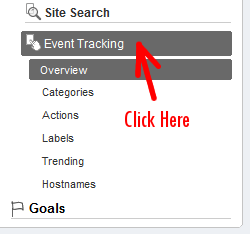
So what’s all this look like from inside Google Analytics? It’s a batch processing system, so first you need to wait overnight for your data to come through. Next, log in, pick your site and select ‘Event Tracking’.
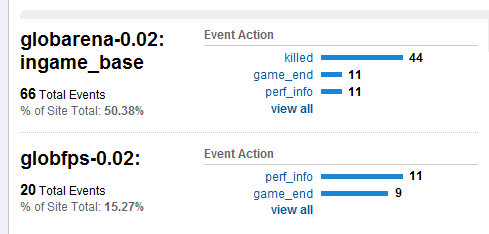
Yes, those are real numbers. Some day I’ll get around to promoting this site. :-)
If I want a breakdown of causes of death in Glob Arena, I hit the ‘killed’ link and get this moneyshot:
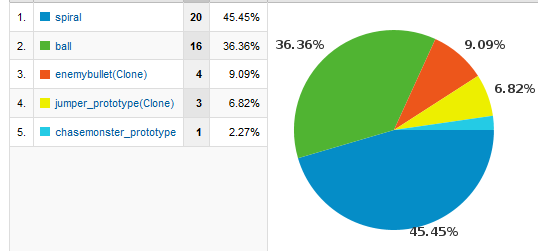
Glorious.
Cross-domain scripting
Unity Player 3 tightened up the security model to match the same-origin policy of Adobe Flash Player. Basically if you request information from a different domain to the one where the .unity3d file is hosted, the owner of that domain has to explicitly allow it using a file called crossdomain.xml. You’d imagine that would prevent the analytics from working, but it’s not affected.With this technique the sequence of events is:
- The app makes a Javascript call to the enclosing page.
- Google’s Javascript snippet rolls up all the event data into a query string, then requests a GIF image from their servers with the query string in the URL.
- Google’s server logs the information in the query string, and sends back an empty GIF which is discarded by the client.
Limitations
Thankfully, collecting personally identifiable information via Google Analytics is not allowed. Not only is it a sleazy thing to do to your customers, it’ll get your account banned.This means that you’ll only get aggregate information on player behaviour. You can split the statistics up into sub-populations using the Advanced Segments tool, but it won’t ever show you a log of some individual’s actions. Google Analytics is no substitute for asking someone to test your game, while you look over their shoulder.